Why Browser-Based POS Slows Laundromats in 2026

Browser-based POS systems slow laundromats because they run inside web browsers built for displaying documents, not processing fast, high-volume transactions. The browser rendering engine introduces synchronous layout recalculations, memory limits, and garbage collection pauses that degrade counter speed exactly when you need it most. Native apps bypass these constraints entirely by calling the operating system directly. For laundromat owners managing complex wash-and-fold orders, multi-item pricing, and peak-hour rushes, understanding why browser-based POS slows laundromats is the first step toward fixing the problem.
Why browser-based POS slows laundromats: the architecture problem
The root cause is not your internet connection. Browsers were designed for document display, not real-time transactional interfaces. Every time your POS updates the screen, the browser runs a synchronous layout recalculation that touches every element on the page. This causes what developers call “jank,” the visible stutter you see when tapping a button and waiting a beat too long for a response.
The Document Object Model, or DOM, is the browser’s internal map of every element on screen. Excessive DOM size pushes interaction delays above 500ms on typical tablets when node counts exceed 3,000. Cutting that count from 5,000 nodes to 1,000 nodes drops interaction delay from 420ms to 50ms. That difference is the gap between a customer waiting and a customer walking out.

Browser-based POS systems operate at 30–50 frames per second and show significant latency under heavy loads, while native apps maintain 60 frames per second and sub-100ms response times. That 10–20% performance gap compounds during busy periods. A single slow tap at the counter during a Saturday morning rush costs you real time and real customer goodwill.
JavaScript garbage collection adds another layer of pain. The browser periodically pauses all JavaScript execution to reclaim memory, causing random 30–50ms freezes. During a high-volume shift, those pauses stack up. Your attendant taps “add item,” the screen freezes for half a second, and the line grows.
Pro Tip: If your POS feels slow only during busy hours, garbage collection pauses are likely the cause. The more items and modifiers added per transaction, the more objects the browser creates and must eventually clean up.
How laundromat workflows make browser POS lag worse
Laundromat transactions are not simple. A single wash-and-fold order can include weight-based pricing, fabric type modifiers, special instructions, rush fees, and customer loyalty credits. Each modifier added to an order triggers a DOM update. Each DOM update triggers a layout recalculation. The more complex the order, the harder the browser works to keep the screen current.
Here is where browser POS performance issues become a laundromat-specific problem:
- Multi-item basket complexity. Large promotional calculations and multi-item baskets cause UI freezes regardless of internet speed. Your attendant is not waiting on Wi-Fi. They are waiting on the JavaScript engine to finish calculating.
- Peak-hour object churn. High transaction volume during morning and evening rushes creates more browser objects per minute. More objects mean more frequent garbage collection pauses. The busiest hours become the slowest hours for your POS.
- Tab reload interruptions. On iOS, Safari limits browser memory to roughly 100–200MB. Under heavy load, the browser reloads the tab entirely. Your attendant loses the transaction mid-checkout and must start over.
- Offline sync failures. Most browser POS systems use local storage APIs like IndexedDB that lack robust sync and queuing. When your internet drops for 30 seconds and comes back, those systems struggle to reconcile what happened. Transaction data gets lost or mismatched.
- Park-and-resume friction. Laundromats regularly pause a transaction while a customer runs to their car or checks a pocket. Browser POS systems hold that state in memory. Under load, that memory gets reclaimed, and the parked order disappears.
The result is a counter that feels sluggish precisely when your store is fullest. That is not a coincidence. It is the architecture working against you.
How does native POS architecture compare to browser-based systems?
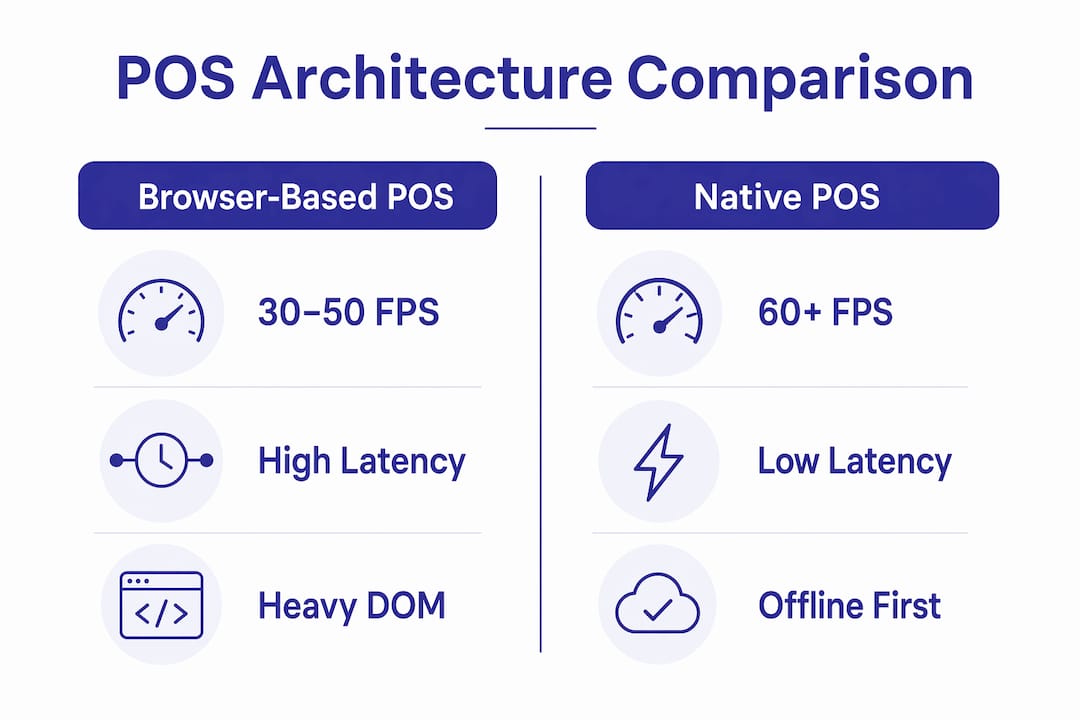
Native apps call the operating system directly. They do not route rendering through a browser engine. This gives them access to hardware-accelerated graphics, independent layout engines, and memory management that the OS controls rather than a JavaScript runtime.
Progressive Web Apps, or PWAs, sit between browser apps and native apps. They reduce some browser overhead by caching assets and running service workers in the background. However, PWAs still lag behind native performance because they cannot fully escape browser rendering constraints. They are a partial fix, not a solution.
The table below compares the three architectures on the factors that matter most at the laundromat counter.
| Factor | Browser-based POS | Progressive Web App | Native iOS app |
|---|---|---|---|
| Frame rate | 30–50 FPS | 45–55 FPS | 60 FPS |
| Response time | 200ms+ under load | 100–150ms | Sub-100ms |
| Memory management | Browser-controlled, aggressive tab reload | Partial caching | OS-controlled |
| Offline reliability | Weak, depends on IndexedDB | Moderate, service workers | Strong, native state management |
| Hardware integration | Limited via web APIs | Limited via web APIs | Full Bluetooth, printer, scale access |
| Transaction recovery | Manual restart after tab reload | Partial | Automatic state preservation |
The offline column matters more than most owners realize. Offline-first architecture must be foundational, not an add-on. Browser POS systems that rely on service workers face thundering herd sync issues when multiple terminals reconnect after an outage. Native apps with proper state machines handle reconnection without losing a single transaction.
What can laundromat owners do about slow POS systems?
You have two paths: reduce the impact of browser POS limitations, or switch to an architecture that does not have them.
If you are staying with a browser-based system for now, these steps reduce the worst effects:
- Reduce DOM complexity. Ask your POS vendor how many DOM nodes their interface uses. Anything above 1,500 nodes on a tablet will produce visible lag. Push for a simplified UI mode if one exists.
- Limit open browser tabs. Every open tab competes for the same memory pool. On iOS, that pool is capped. Keep your POS as the only active tab on any device used at the counter.
- Prioritize offline-first vendors. Ask directly: “What happens to my transaction if the internet drops for two minutes?” If the answer involves data loss or manual re-entry, the system lacks proper offline architecture.
- Match hardware to the browser’s needs. Devices with more RAM reduce the frequency of tab reloads. An iPad with 6GB of RAM handles browser memory pressure far better than an entry-level Android tablet with 2GB.
- Audit peak-hour performance separately. Test your POS during your busiest hour, not during setup. Browser POS performance issues appear under load, not in a demo environment.
Pro Tip: Ask your current POS vendor for their Interaction to Next Paint score on a device with 3GB of RAM. If they cannot answer, that tells you everything about how seriously they have tested real-world counter performance.
When mitigation stops being enough, the right move is switching to a native or hybrid platform built specifically for laundromat workflows. The performance gap between browser-based and native systems is structural. You cannot patch your way out of it.
Key Takeaways
Browser-based POS systems slow laundromats because their rendering architecture, memory limits, and offline weaknesses are incompatible with the speed and complexity that laundromat counter work demands.
| Point | Details |
|---|---|
| Browser rendering causes lag | Synchronous layout recalculations block the UI on every DOM update, creating visible stutter. |
| DOM size drives interaction delay | Reducing DOM nodes from 5,000 to 1,000 cuts interaction delay from 420ms to 50ms. |
| Laundromat orders amplify the problem | Complex modifiers and multi-item baskets increase DOM updates and garbage collection frequency. |
| Native apps outperform browser POS | Native iOS apps maintain 60 FPS and sub-100ms response times versus 30–50 FPS for browser systems. |
| Offline architecture is non-negotiable | Browser POS systems without robust offline-first design lose transactions when connectivity drops. |
The misconception that costs laundromat owners the most
Operators almost always blame the router first. I have seen it dozens of times: a slow POS, a call to the internet provider, a technician visit, and no improvement. The connection was never the problem.
Runtime responsiveness is the actual bottleneck. The JavaScript engine locks the main thread during complex calculations, and no amount of bandwidth fixes that. Faster internet does not help a browser that is busy recalculating layout.
What surprises me most is how long operators tolerate the slowness once they understand the cause. The attitude becomes “that’s just how POS systems work.” It is not. Native apps on the same device, handling the same transaction, feel instant by comparison. The difference is not subtle. It is the difference between a counter that flows and one that grinds.
The owners who switch to native architecture almost always say the same thing: they did not realize how much time they were losing until they stopped losing it. A two-second delay per transaction across 80 transactions a day adds up to nearly three minutes of pure wait time. Multiply that by 365 days and you have lost nearly 18 hours a year to browser lag alone.
My honest advice: stop treating POS speed as a software setting you can adjust. It is an architectural decision. Make it deliberately.
— Artur
Kansoflow was built for the speed your counter demands

Kansoflow is a native iOS POS platform built specifically for laundromat owners who are tired of counter lag, lost transactions, and systems that fall apart during the morning rush. It runs directly on iOS, bypassing browser rendering entirely, which means 60 FPS performance and sub-100ms response times at the counter. The platform handles complex wash-and-fold orders, weight-based pricing, park-and-resume transactions, and Bluetooth scale integration without the slowdowns that browser-based systems produce under load. Offline reliability is built into the architecture from the ground up, not added as an afterthought. See exactly how it works on the Kansoflow features page and find the plan that fits your operation at Kansoflow.com.
FAQ
Why does my laundromat POS slow down during busy hours?
Browser-based POS systems slow down under load because high transaction volume increases JavaScript garbage collection frequency and DOM update complexity. The busiest hours produce the most browser objects, which triggers more frequent memory pauses.
Is slow POS a network problem or a software problem?
Slow POS is almost always a software architecture problem, not a network problem. Runtime responsiveness, specifically the JavaScript engine locking the main thread, causes the lag regardless of internet speed.
What is DOM size and why does it affect my POS speed?
The DOM is the browser’s internal map of every element on your POS screen. Larger DOM sizes force more style recalculations on every update. Reducing DOM nodes from 5,000 to 1,000 cuts interaction delay from 420ms to 50ms.
Do Progressive Web Apps solve browser POS performance issues?
Progressive Web Apps reduce some browser overhead through caching and service workers, but they still lag behind native app performance. They do not eliminate synchronous layout recalculations or browser memory limits.
What should I look for in a faster laundromat POS system?
Look for a native app architecture, offline-first transaction handling, and hardware integration with scales and printers. These three factors separate systems that perform under pressure from those that stall during your busiest shifts.